
Snes9x EX+
Robert BrogliaArcade
4.25.80K Reviews
- Version
- 1.5.85
- Installs
- 10.00M
- Age Rating
- Everyone
Screenshots
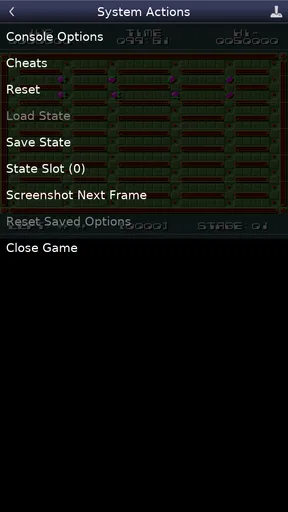
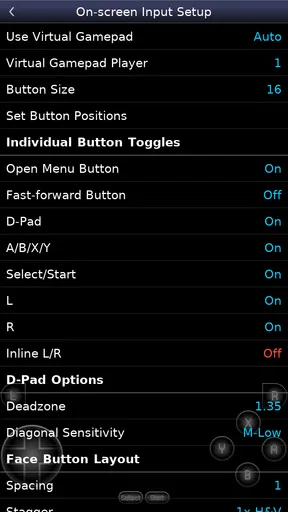
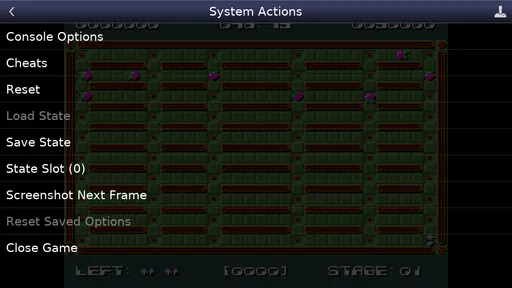
Our Review of Snes9x EX+
 Analysis by Appyee
Playing classic Super Nintendo games on a phone sounds simple until the controls feel wrong, games fail to load, or the emulator gets in the way of the experience. Snes9x EX+ takes a more practical approach. Developed by Robert Broglia, this free arcade game for Android is built around emulation rather than modern presentation, and I found that focus to be its biggest strength. It gives me a direct way to play SNES software on a compatible device without surrounding the experience with unnecessary extras.
My overall view is straightforward: this is a capable choice for people who already understand emulation and want a lightweight way to revisit their own game collection. It is less suitable for someone expecting a polished, console-like interface that explains every step. The app does its main job well, but the quality of the experience depends heavily on the phone, the gamepad or touch controls, and the user’s willingness to organize things personally.
Why the core emulation experience works
The first thing I noticed is how quickly the app gets out of the way. Rather than presenting itself as a social platform, a storefront, or a large entertainment hub, it behaves like a focused SNES emulator. That makes it useful when I want to start a game, adjust a few settings, and get back to playing instead of navigating layers of content.
That simplicity also makes it flexible. A phone can become a convenient second screen for short sessions, while a tablet gives the on-screen controls more room. With a physical controller, the experience feels much closer to the original console, especially in games that depend on precise directional input or quick button combinations. Touch controls remain useful for testing a game or playing something slower, but I would not choose them for every action-heavy title.
The app’s long presence on Android is part of its appeal. It was released on January 11, 2013, and the current version is 1.5.85. That history matters because an emulator is not something I judge only by its icon or first launch. I care about whether it remains usable across changing phones and operating systems, and this project has clearly stayed relevant for a long time. Its minimum operating system requirement is Android 2.3, which makes the software unusually accessible on older hardware.
Its audience is also visible in the numbers people have given it: a 4.2 average from around 115 thousand ratings, with more than 10 million installs. I would not treat those figures as proof that every game will run perfectly on every device, but they do suggest that this is an established tool rather than an obscure experiment. The rating is not flawless, which feels believable for an emulator: results vary according to the handset, the game, the controller, and the user’s setup.
One practical advantage is that I can use it in different ways. For a brief commute, I might load a game and play with touch controls. At home, I would rather connect a controller and use a larger display. On an older spare phone, the low minimum system requirement makes it worth considering as a dedicated retro device, provided the phone can handle the games and the user is comfortable preparing the library.
Getting started without unnecessary confusion
The first important distinction is that an emulator is not the same thing as a game collection. Snes9x EX+ provides the environment for running SNES software; it does not turn the setup into a ready-made catalog of games. I recommend deciding how you will manage your legally obtained game files before spending time adjusting controls. A tidy folder structure makes a bigger difference than many small visual settings.
I usually begin with a small selection rather than copying everything at once. That makes it easier to identify whether a problem comes from a particular file, a control layout, or the device itself. It also keeps the menu manageable. If you are introducing a child or a less technical family member to retro games, preparing a short, clearly named selection is kinder than handing them a crowded folder and expecting them to understand emulator terminology.
Another useful habit is to test a game for several minutes before committing to a long session. Some problems only appear after a menu transition, a change of level, or a demanding visual effect. Testing early helps separate a genuine compatibility issue from a temporary control mistake. It is a small workflow improvement, but it prevents the frustrating situation of discovering a problem after making substantial progress.
The app is free, which lowers the barrier to trying it. That does not remove the need for patience, though. Free access is valuable here because the real investment is usually the time spent arranging files, learning the interface, and choosing a comfortable control method. If you want something that behaves exactly like a modern console from the first tap, the lack of a guided setup may feel like a drawback rather than a benefit.
Controls are where the experience changes most
Touch controls are the part I would evaluate most carefully. They make the emulator immediately usable, but a phone screen cannot reproduce the tactile separation of a SNES controller. My thumb can drift across a virtual directional pad, and simultaneous button presses feel less natural than they do on physical hardware. Platform games, fighting games, and titles with demanding timing expose this weakness quickly.
For slower role-playing games, puzzle games, menu-heavy adventures, and turn-based experiences, touch input is often perfectly reasonable. The screen gives me enough access to the buttons without requiring extra equipment. For fast action, I strongly prefer a physical controller. This is not a criticism unique to the software; it is a trade-off of playing a button-based console on a flat screen. Still, it affects whether the app feels relaxing or irritating.
I also suggest trying the control arrangement in a low-pressure section of a game rather than during a difficult boss fight. A virtual button can look correctly placed while still feeling awkward once both hands are active. Small changes in spacing and position can make a session much more comfortable. The best layout is personal, and I would expect to spend a few minutes finding one that suits the size of my phone and the way I hold it.
A controller introduces another decision: portability versus comfort. Touch input keeps the entire setup inside the phone, which is ideal when I have only a few minutes. A gamepad adds bulk, but it makes longer sessions more enjoyable and reduces accidental presses. If your main goal is to replay games with demanding controls, the controller is not an optional luxury in practical terms; it is part of the experience you are building around the emulator.
Save habits matter more than most new users expect
One of the most useful ways to approach an emulator is to treat saving as part of the routine. I prefer using a game’s own save system whenever possible, then using an emulator save state only as a convenience for short interruptions. That distinction keeps the playthrough feeling closer to the original design while still allowing me to pause when real life gets in the way.
Save states are especially helpful when I am testing controls, checking whether a troublesome section runs correctly, or squeezing a session into a short break. They can also make older games friendlier when I do not remember where the original save points are. The trade-off is that relying on them too heavily can remove the intended tension and make it easier to overwrite progress accidentally. I recommend using descriptive habits, such as keeping one state for experimentation and relying on normal saves for a serious playthrough.
Before moving a library to another phone, I would make a deliberate backup of the relevant files and progress rather than assuming everything will transfer automatically. An emulator can be reliable while the user’s storage habits remain messy. This is one of the less obvious lessons of retro gaming on mobile: the most damaging problems often come from disorganized files or careless transfers, not from the game itself.
That is also why I would avoid treating the app as a replacement for a proper backup strategy. If a particular playthrough matters to you, keep an extra copy in a safe location. The emulator makes portable gaming convenient, but convenience can encourage people to forget that saved progress is still data that deserves care.
Where the app shows its age
The biggest weakness is not the basic idea; it is the amount of responsibility left to the user. Someone familiar with ROM folders, controller mapping, and emulator terminology will probably appreciate the directness. Someone who has never used an emulator may wonder why the app does not simply show a polished library with every game ready to play. That gap can make the first session feel more technical than expected.
The interface also has a utilitarian character. I do not open it for elegant browsing, animated artwork, or a carefully curated discovery experience. Its purpose is functional, and that can feel dated beside newer gaming platforms. If you want a living-room presentation with a unified catalog, automatic organization, and minimal setup, a dedicated console or a more front-end-oriented solution may suit you better.
There is another limitation that is easy to overlook: performance is not a single promise that applies equally to every title and device. A modern phone may provide a comfortable experience, while an older handset may expose slowdowns, awkward scaling, or controls that feel cramped. The broad Android compatibility is appealing, but the minimum operating system requirement should not be mistaken for a guarantee of identical results on every device that meets it.
Audio and display preferences can also become personal friction points. Retro games were designed around older screens, different aspect ratios, and television viewing distances. On a bright modern phone, the image may look sharp but also reveal imperfections that were less noticeable on original hardware. I enjoy the clarity, yet I sometimes find that a larger screen or a controller does more to improve the experience than another round of technical tweaking.
Finally, the app is not the best choice for people who want a completely sealed, distraction-free console experience. Mobile notifications, battery concerns, changing hand positions, and the temptation to switch apps all remain part of playing on a phone. The emulator can reproduce the game environment, but it cannot reproduce the physical comfort or focus of sitting in front of a dedicated console.
Who should use it, and who should skip it
I would recommend Snes9x EX+ to retro players who already own or can legally access the games they want to play, especially those who value portability and control over their setup. It is a strong fit for someone who wants to revisit a small personal library on several types of Android hardware, or for a player who enjoys adjusting controls and organizing files until everything feels right.
It is also a good match for short, practical sessions. Imagine waiting for an appointment with a phone and a compact controller in a bag. Instead of carrying a separate console, I can open a familiar game, play for fifteen minutes, and stop without needing a television. The same setup works during travel, although I would test the controller and save routine before leaving home rather than discovering a problem halfway through a trip.
Families may find it useful when an adult prepares the setup first. A curated folder and a comfortable control layout can make the experience approachable for younger players, and the Everyone content rating supports that broad accessibility. The rating describes the app’s suitability, not the content of every game a user chooses to run, so parents should still make their own decisions about the specific titles in the library.
I would skip it if you expect the app to supply games, explain emulation from scratch, or deliver the same effortless interface as a current console. I would also look elsewhere if your priority is competitive precision with touch controls. For that audience, a physical system or a platform designed around modern controller support will likely be less frustrating.
Compared with playing on original hardware, the emulator wins on portability, convenience, and the ability to use a device already in your pocket. Original hardware wins on tactile authenticity, simple plug-and-play behavior, and the feeling of using the intended controller and display. Compared with a general mobile game, this app offers a much more direct connection to a specific console era, but it asks the player to take care of setup details that ordinary mobile games hide.
My final recommendation
After using it as a practical SNES player rather than expecting a modern gaming platform, I came away positive. The free price, broad device accessibility, and focused design make it easy to understand why the app has attracted a large audience. Robert Broglia’s project is strongest when I bring my own legally obtained games, choose a sensible control method, and accept that a little organization is part of the process.
The clearest reason to choose it is control over the experience without paying for a complicated front end. I can use touch input for convenience, add a physical controller for demanding games, and build a small library that suits my habits. That flexibility is more meaningful than flashy presentation, especially for players who already know which SNES games they want to revisit.
My reservation is equally clear: beginners may mistake its directness for simplicity. The app itself is straightforward once configured, but getting to that comfortable point can require file management, control adjustments, and sensible saving habits. Those tasks are manageable, yet they should be part of your expectations before installing it.
At its current version, 1.5.85, this remains a worthwhile Android arcade choice for people who want portable SNES emulation and are prepared to participate in the setup. I would recommend it to experienced retro players, curious newcomers willing to learn, and anyone building a modest travel-friendly collection. I would not recommend it to someone seeking a completely automatic, console-like package. For the right user, though, Snes9x EX+ is a dependable bridge between classic games and the phone already in your hand.
Verdict
Strengths of Snes9x EX+
- Accurate SNES emulation with smooth performance on many devices.
- Supports save states for quick progress recovery.
- Offers customizable on-screen controls and external controller support.
- Includes useful features such as screenshots and fast-forwarding.
- Works offline and does not require an account or subscription.
Limitations of Snes9x EX+
- The interface feels dated and may take time for new users to understand.
- ROM files are not included and must be obtained legally by the user.
- Touch controls can feel less precise during fast-paced games.
- Some advanced options may be confusing without emulator experience.
- Compatibility and performance can vary across older Android devices.
Other Releases by Robert Broglia
View All
MD.emu (Genesis Emulator)
Arcade4.2

NES.emu (NES Emulator)
Arcade4.3

GBA.emu (GBA Emulator)
Arcade4.3

NEO.emu (Arcade Emulator)
Arcade3.4
Similar Picks in This Category
View All
Subway Surfers
SYBO Games4.6

Stickman Party 234 MiniGames
PlayMax Game Studio4.6

Subway Princess Runner
Ivy4.4

Temple Run
Imangi Studios4.2

Zombie Tsunami
Mobigame SAS4.6

Stack Ball - Crash Platforms
CASUAL AZUR GAMES4.5
Frequently Asked Questions
What is Snes9x EX+ and what devices does it support?
Snes9x EX+ is an open-source Super Nintendo Entertainment System emulator for Android devices. It allows you to play compatible SNES games using legally obtained ROM files. The app is designed to run on a wide range of phones and tablets, including older hardware, although performance can vary depending on the device, Android version, game, and graphics settings.
Does Snes9x EX+ include games, or do I need to provide my own ROMs?
Snes9x EX+ does not include commercial SNES games, and downloading copyrighted ROMs from unofficial websites may be illegal in your country. To use the emulator responsibly, you should provide ROM files that you legally own or have permission to use. After transferring them to your device, the app can scan selected folders and organize compatible games for easier access.
Can I use external controllers with Snes9x EX+?
Yes, Snes9x EX+ supports touchscreen controls and can also work with many physical gamepads, including compatible Bluetooth and USB controllers. A controller usually provides a much more comfortable experience than the virtual buttons, especially for platformers and action games. Compatibility may depend on Android, the controller model, connection method, and button-mapping options.
What features does Snes9x EX+ offer besides basic emulation?
Snes9x EX+ includes several useful features for improving the retro gaming experience, such as save states, customizable on-screen controls, support for different display orientations, fast-forwarding, audio and video configuration, and controller customization. It can also remember game progress through standard save files. Some advanced options may require experimentation to achieve the best balance between performance and visual quality.
Does Snes9x EX+ run every SNES game perfectly?
Snes9x EX+ offers strong compatibility with a large selection of Super Nintendo games, but no emulator can guarantee flawless performance with every title. Certain games may show graphical glitches, sound issues, slowdown, or problems with special enhancement chips. Performance can also vary between devices. If a game does not work correctly, checking the ROM format, emulator settings, and device compatibility is recommended.
Play our best games!


